
Vietcaso

FAMS

Primary school fee management software

Tuition, other fees, the cash book and payroll for a primary school in one system

FAMS helps a primary school’s accountant and cashier collect monthly tuition, print receipts, see who still owes, and manage other fees, income and expense vouchers and staff payroll.

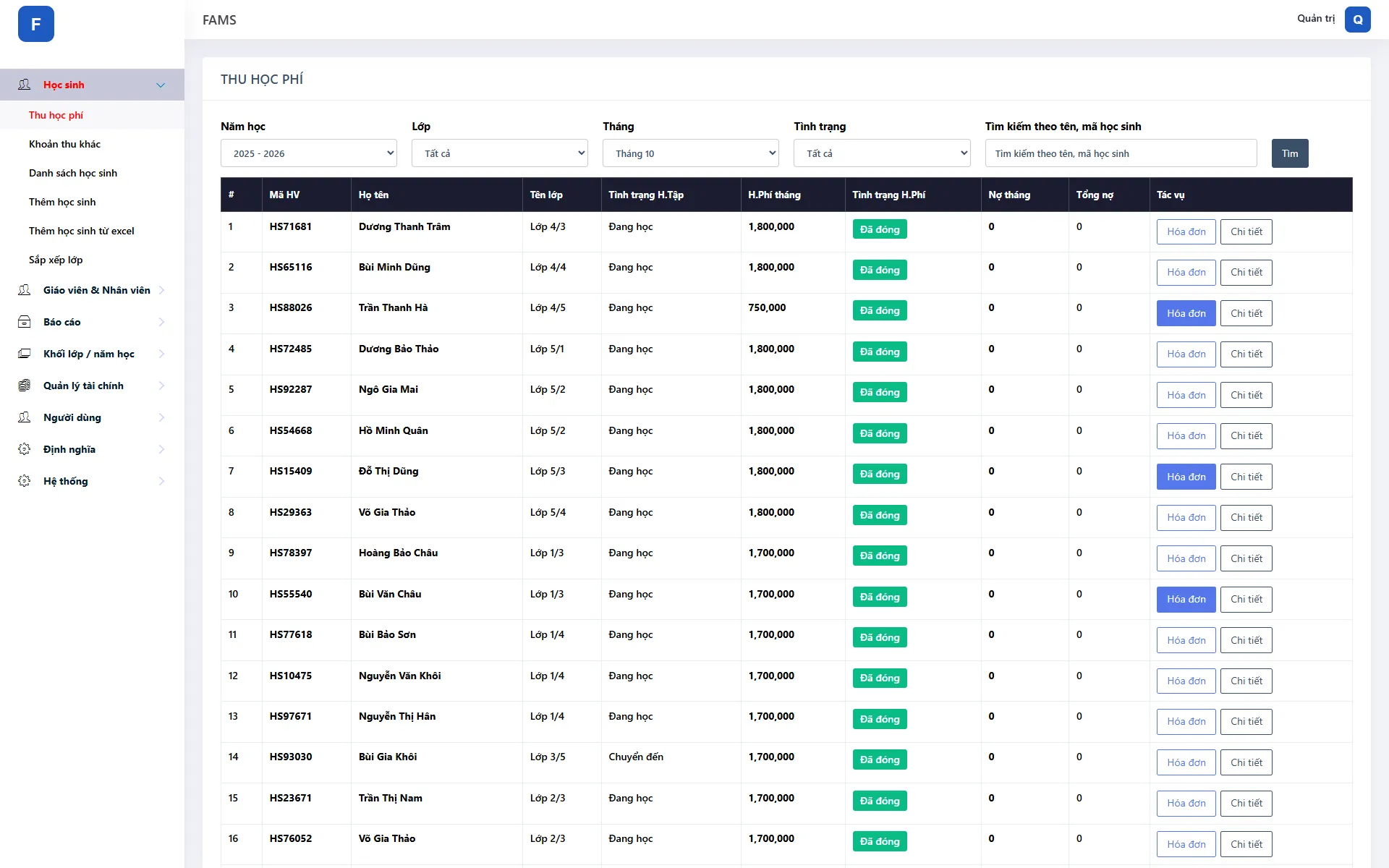
FAMS · Monthly tuition: status, arrears and receipts per student
FAMS – monthly tuition collection
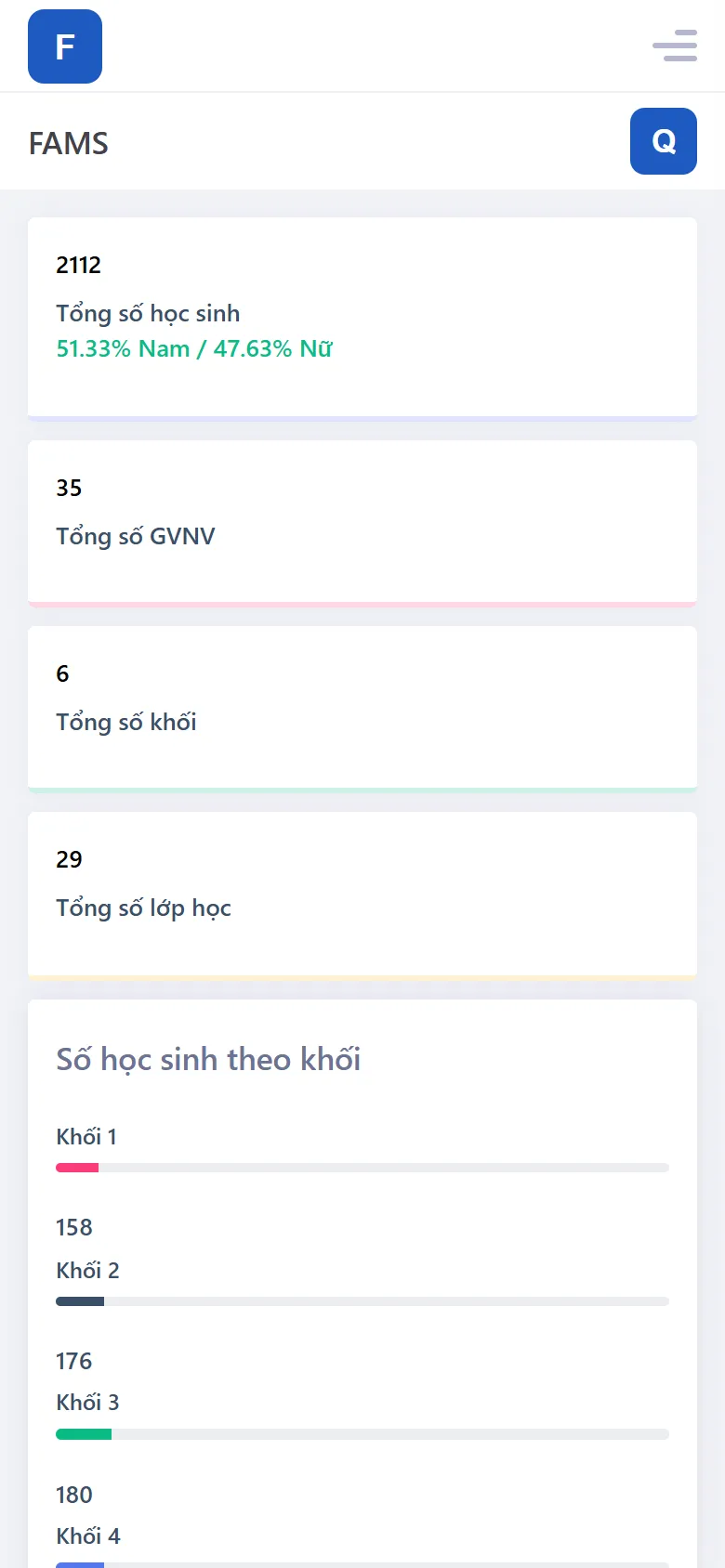
FAMS on mobile – students by grade

2,000+

student records

29

classes in one school

35

staff on the payroll

8

built-in reports

Running at: A 29-class primary school with nearly 1,000 students

Primary school fee management software

FAMS – Primary school fee management software

FAMS is finance software built for primary schools, replacing tuition ledgers and scattered spreadsheets. Tuition is set per grade or per class, for every month of the school year; when a parent comes to pay, the cashier finds the student, records the payment and prints a receipt on the spot. The board sees payment status by month, by school year or for any date range, alongside the school’s cash book and payroll.

  • Tuition per grade or class and per month, with boarding fees kept separate
  • Print a receipt per student or in batches
  • Payment status by month, school year or date range
  • Other fees – parent fund, insurance, textbooks… – by school year and term
  • Monthly payroll: seniority, position and qualification allowances, extra periods
  • Excel import for students and staff; Excel reports

The problem

What does FAMS solve?

Before: Tuition recorded in notebooks or spreadsheets; hard to tell who owes which month

With FAMS: Every student has a month-by-month payment history; filter unpaid students instantly

Before: Hand-written receipts are slow and error-prone when parents queue up

With FAMS: Receipts printed from the system with the right amounts, one by one or in batches

Before: Each grade pays a different rate, plus many other fees during the year

With FAMS: Tuition defined per grade; other fees added by the school and collected separately

Before: The cash book and staff pay live in separate ledgers, hard to reconcile at month-end

With FAMS: Vouchers, payroll and reports in the same system, exported to Excel

Features

Key features of FAMS

Student fees

Tuition, other fees and each student’s payment status.

Tuition collection

Collect monthly tuition straight from the student list and print the receipt at once.

  • Tuition per grade or per class, for every month of the year
  • Boarding fees kept separate and added up automatically
  • Months in arrears and total owed for every student
  • Print receipts one by one or in batches, with who collected

Other fees

Fees beyond tuition, collected and tracked separately.

  • Parent fund, accident and health insurance, textbooks, summer activities…
  • Fee groups and amounts by school year and term
  • Due, paid and outstanding per student
  • Batch receipt printing and an other-fees report

Payment status

See at once who has paid and who still owes.

  • By month, for the whole school year or any date range
  • Fee, paid, outstanding and collector for every student
  • Filter by grade, class and payment status
  • Export to Excel and reprint receipts straight from the report

Students & staff

Student records, class placement, staff and payroll.

Student records

The whole school’s students by grade, class and school year.

  • Add students one by one or import them from Excel
  • Preview the data before importing
  • Student lists by class and by grade
  • Export student lists to Excel

Class placement

Set up classes for the new school year.

  • Grades, classes and school years configured by the school
  • Place students into classes for each school year
  • Keeps each student’s class-change history

Teachers & staff

Teacher and staff records and class assignments.

  • Position, qualifications, duties
  • Add staff one by one or import from Excel
  • Assign teachers and staff to classes
  • Staff list exported to Excel

Payroll

Monthly staff payroll in the same system as the cash book.

  • Base pay, pay rate, position and qualification coefficients
  • Seniority allowance by years of service
  • Extra-period pay by additional lessons taught
  • Totals calculated automatically; pay rates configurable

Finance & administration

The school’s cash book, reports, permissions and backups.

Income & expense vouchers

Every income and expense gets a voucher and a history.

  • Create income and expense vouchers
  • Voucher types defined by the school
  • Voucher history with quick search
  • Cash book report exported to Excel

8 built-in reports

Student, staff, tuition and cash-book reports exported to Excel templates.

  • Student lists, students by grade
  • Teacher and staff list
  • Payment status by month, school year and date range
  • Other fees and the cash book

Permissions, backups & settings

Everyone does exactly their part; financial data is backed up.

  • Task-based permissions: collecting fees, fee setup, payroll, reports…
  • User management
  • Data backups
  • School-wide settings

Interface

Real screens from FAMS

FAMS · Monthly tuition: status, arrears and receipts per student
FAMS – monthly tuition collection

Monthly tuition: status, arrears and receipts per student

Screenshots from the live system; data has been replaced with sample data.

Extend as you grow

Vietcaso builds these extensions to each customer’s needs:

  • Tuition payment by bank QR with automatic reconciliation
  • A parent web app for fees and payment history
  • Fee reminders via Zalo OA/ZNS, SMS and email
  • E-invoices

Rollout & pricing

  • Monthly subscription or dedicated licence
  • Data migration from Excel, your own branding
  • Hands-on training and post-launch support
Get a quote

FAQ

Frequently asked questions

Can’t find what you need? Ask the Vietcaso team directly.

Contact us
Each grade pays a different rate. Does FAMS handle that?

Yes. Tuition is set per grade or per class for every month of the school year, with boarding fees kept separate; fees beyond tuition are defined by the school and collected separately.

Can we print receipts for parents?

Yes. The cashier prints a receipt right after collecting, or batch-prints receipts for many students at once.

We keep students in spreadsheets today. Can we switch?

Yes. FAMS imports students and staff from an Excel template with a preview step, and the Vietcaso team helps migrate your data during onboarding.

Who can see and change financial data?

Permissions are split by task – collecting fees, fee setup, payroll, cash book, reports… Each account only does what it is assigned, and administrators can back up the data from within the app.

Ready to digitise your operations?

Book a free call. We’ll listen to your challenge and recommend the best fit – an existing product or something built for you.